
Bookings from enquiry to folio
Website requests, phone and walk-in bookings share one calendar. Confirm with a code, assign a room or hall, and keep room nights, food and extras on one folio.
ORVOPS Hospitality is the management software behind an independent hotel: direct room and hall bookings, a live room board, a guest portal opened by a booking code, QR food ordering billed to the room, GST invoices, expenses, monthly payroll with PDF payslips, staff roles and an editable website. Hotel The Mumbai Resort in Shivpuri is the reference property running it; the resort's public website is a separate site, not this product.
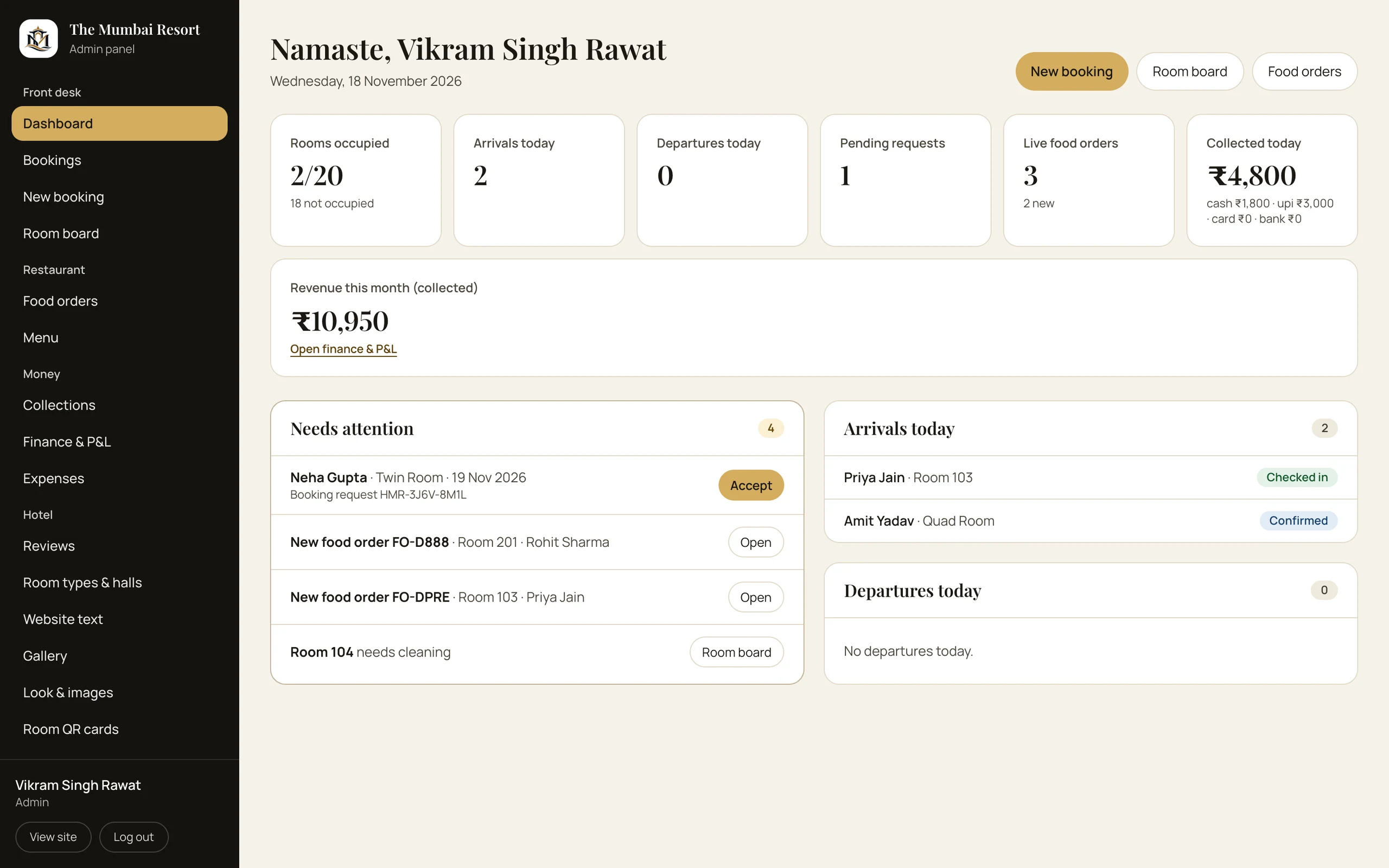
Reference property: Hotel The Mumbai Resort, Shivpuri
What is inside
Bookings, room QR, housekeeping, GST billing and staff payroll — an operating system for independent hotels and resorts.
Website requests, phone and walk-in bookings share one calendar. Confirm with a code, assign a room or hall, and keep room nights, food and extras on one folio.
Occupied, free, dirty and blocked rooms, today's arrivals and departures, and housekeeping updates from a phone. Check-in and check-out move the room in the same step.
Each room gets a permanent QR card. Scan it to see the stay, live bill, menu and checkout signature — then order food without calling the front desk.
Guest ID at check-in, deposits, part payments, refunds, payment modes and a GST invoice. Collections are counted per shift, not reconstructed at month end.
Every staff member carries a salary record. Each month adds allowances, additions, deductions and loss of pay, then generates a PDF payslip with net payable and year-to-date.
Record expenses by category, payee and mode. Collections, payroll and expenses roll into monthly profit-and-loss, cash-flow and GST reports.
QR orders arrive with the room number; the kitchen updates status and hides sold-out dishes. The charge lands on the guest's folio, not a separate food ledger.
Hero, rooms, photos, galleries, policies, social links and theme are edited in the panel. A price or photo change does not need a developer.
Owner, reception and guest access stay separate, staff logins can be created or revoked, and sensitive changes are recorded with who did them and when.
In the product
Move through the screens that carry a working day in Hospitality.
A booking is one record, not a WhatsApp thread. Card 1 of 5.
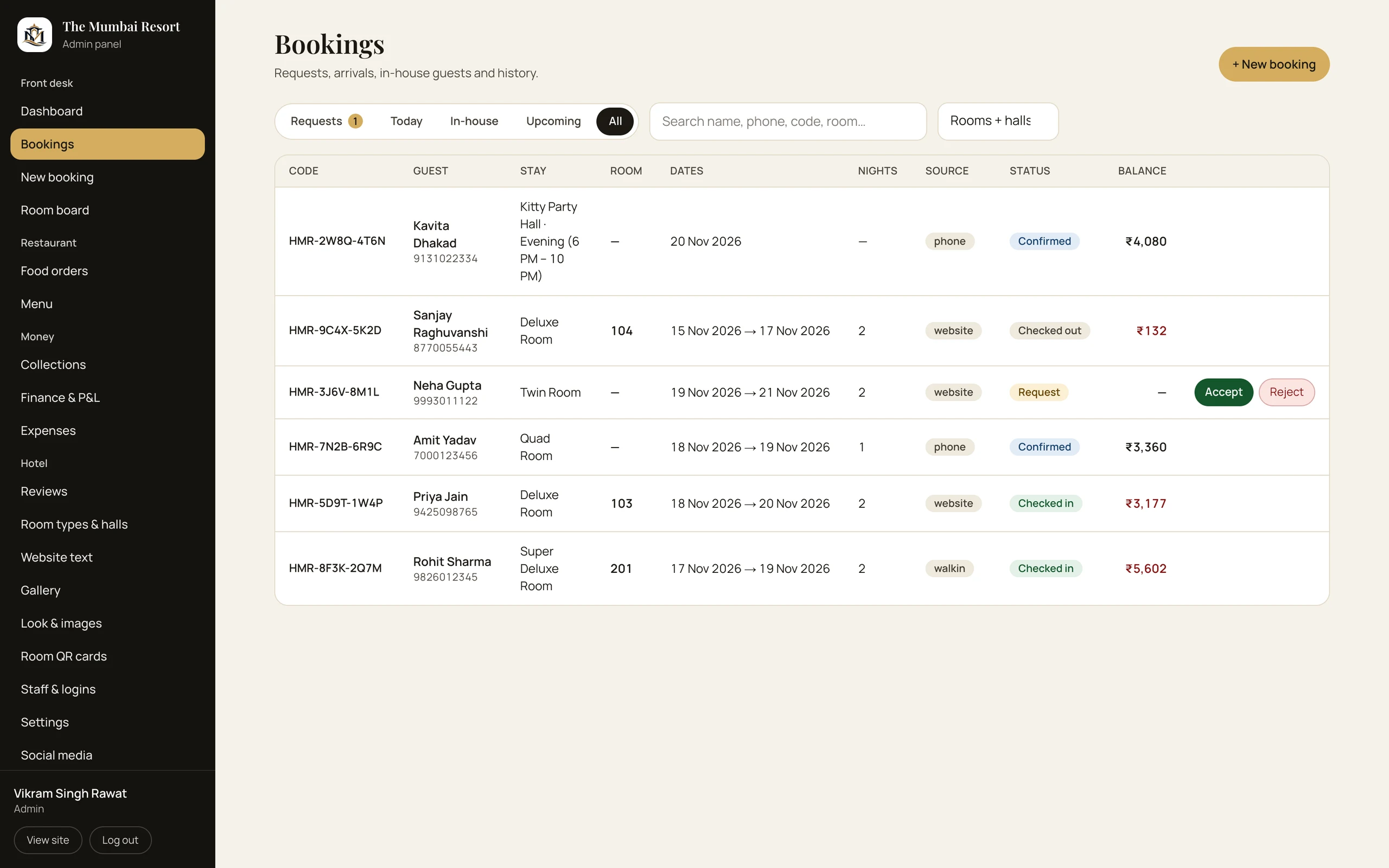
Bookings
A request from the hotel's own site becomes a coded booking with dates, room, tariff and guest details. Availability is checked before confirmation, and the same record becomes the folio at check-in.
01 / 05
Screenshots
Every image below is a screenshot of the product — captured from the build, not assembled in a design tool.
Why this product
Features are easy to list. These are the choices that decide whether the system survives a real Monday.
Room nights, food, extras, payments and refunds attach to the booking. The front desk, kitchen and owner read the same balance.
Salary slips, expense entries and collections feed the same finance view. No month-end export to a second spreadsheet.
Guests order from the menu on their phone. The kitchen sees the room, and the bill updates where the stay already lives.
A booking code or in-room QR is enough. Less friction at check-in, fewer reset calls, one stay per code.
Availability, early arrivals, overstays and room status are checked together before a room is assigned.
Reception works on a phone; guests order from a phone. The interface is designed at 375px, not squeezed later.
How it compares
A candid look at this product against the way most teams run the same operation today.
9 capabilities compared
| Capability | ORVOPS HospitalityThis product | OTA + register | Generic PMS |
|---|---|---|---|
| Direct bookings on the hotel's own site | Included | Not included | Partial |
| Guest portal without a password | Included | Not included | Not included |
| QR food ordering to the room bill | Included | Not included | Partial |
| Live room board and housekeeping states | Included | Not included | Included |
| Hall and event slot availability | Included | Not included | Partial |
| Salary, payslips and monthly payroll | Included | Not included | Partial |
| Expenses, cash flow and profit & loss | Included | Partial | Included |
| GST billing and payment reconciliation | Included | Partial | Included |
| Staff roles and an audit trail | Included | Not included | Included |
Direct bookings on the hotel's own site
Guest portal without a password
QR food ordering to the room bill
Live room board and housekeeping states
Hall and event slot availability
Salary, payslips and monthly payroll
Expenses, cash flow and profit & loss
GST billing and payment reconciliation
Staff roles and an audit trail
A comparison of operating approaches. The reference deployment is a single property; multi-property scope is agreed during implementation.
Who uses it
The same data, shown at the level each person is allowed to act on.
Bookings, rooms, halls, menu, staff, website, finance, payroll and settings.
Arrivals, check-in and check-out, room board, folio, payments, refunds and food orders.
Booking, stay, live bill, dining, reviews and checkout signature — by booking code or room QR.
FAQs
Still unsure about something? Ask us directly — the answer will be specific to your operation, not a brochure line.
Ask on WhatsAppNo. ORVOPS Hospitality is the management panel behind the property: bookings, room board, folios, QR orders, expenses and payroll. Hotel The Mumbai Resort in Shivpuri is the reference property running it; its public website is a separate site.
Yes. The product is configured per property: rooms, halls, tariffs, menus, taxes, staff roles and website content. We agree the scope before quoting.
They submit a booking request on the property's website. The front desk confirms it, and the guest gets a booking code. The code opens their stay portal; there is no password to remember.
Each staff member has a salary record. The monthly payroll adds allowances, additions, deductions and loss of pay, then produces a payslip with net payable. Slips can be downloaded as PDFs, marked paid and viewed with year-to-date totals.
The reference deployment collects payment at the hotel and shows UPI for food prepayment. Gateway integration can be scoped for your property if you need card or UPI collection at booking time.
Yes. The website editor covers hero content, rooms, halls, menu, gallery, policies, social links, fonts, colours and logos. The theme has a contrast guard so a brand colour cannot silently break readability.
The reference deployment is a single property. A group can be scoped as multiple properties with shared or separate staff and reporting. We confirm the model before quoting.
Live bill, room and dates, payment history, food ordering, reviews and a checkout signature. Access opens at check-in and closes at check-out.
Next step
Tell us what you run today. We will show the screens that match, answer the hard questions and leave you with a clear next step.
The rest of the suite
Registration to discharge, pharmacy to payroll — the hospital runs on one record, not five systems.
ExploreMess & tiffin managementQR attendance, member plans, tiffin dispatch, rider routes, dues and daily accounts — one console for the whole kitchen.
ExploreInventory & distributionAn append-only inventory ledger with batch expiry, procurement, transfers and GST billing — isolated per organisation at the database.
Explore